
Kenwood TS-2000 Quick Operating Guide
This overview assumes that you are familiar with basic radio functions, but may not be familiar with the complexities and operations of the Kenwood TS-2000 radio. This guide has been designed for the volunteers supporting Eastside Fire & Rescue and the City of Sammamish.

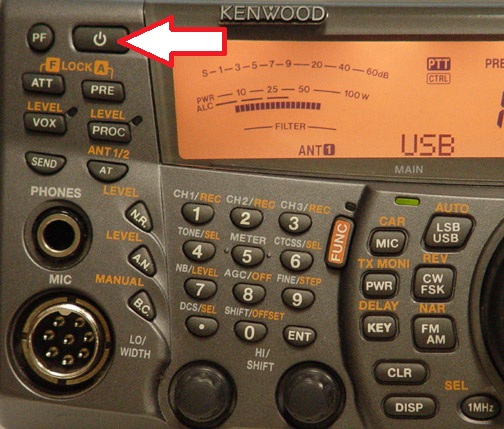 Power On
The first step to operating this radio is to power on the TS-2000. The power button is located on the top left of the front panel. Pressing the power button once should turn the radio on. To turn the radio off, press this button again.
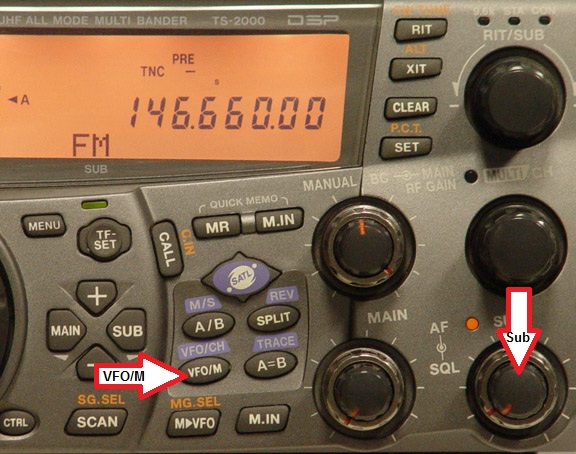 Turn off Sub Band
If the sub-band is turned on, you can turn it off by pressing on the sub volume knob. Pressing this will turn off the right hand frequency display, thus turning off the second receiver. Pressing the knob again will turn the sub receiver back on.
Switch to Memory Mode
Pressing the VFM/M button toggles the radio between memory and VFM. You may need to press this until you see memory channel numbers appear
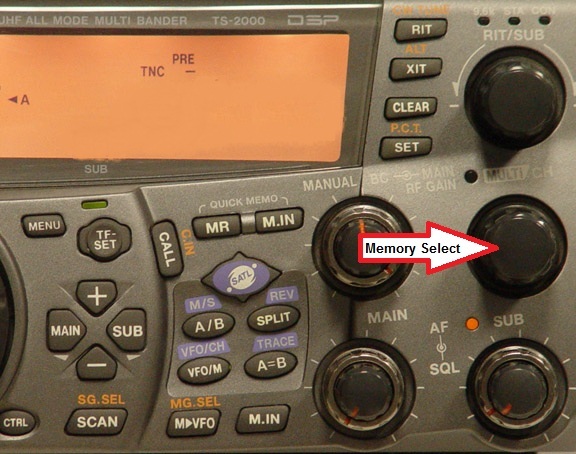 Change Memory Channel
Once in Memory Mode (see above) you will select the appropriate memory channel by turning the Multi/Ch knob on the right hand center side of the radio. Turning this know clockwise will step through the memory channels in increasing order, turning it clockwise will step through the memory channels in decreasing order. As you turn this knob, the main frequency display will change and you will see the cooresponding memory channel displayed below on the main display.
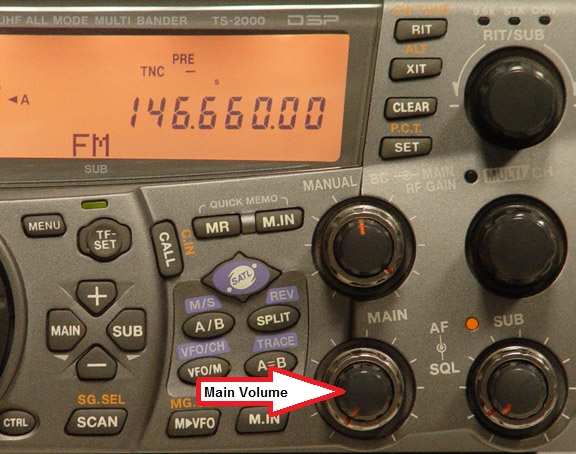 Adjust Volume (stand alone mode only)
The radio at Sammamish City Hall is connected to the Telex interface system and volume is controlled via the computer interface.
If the radio is in standalone mode (operating by itself with seperate microphone), the main volume can be adjusted by turning the outer dial, titled MAIN as shown.